> For the complete documentation index, see [llms.txt](https://wiki.lucysecurity.com/llms.txt). Markdown versions of documentation pages are available by appending `.md` to page URLs; this page is available as [Markdown](https://wiki.lucysecurity.com/application-reference/campaigns/campaign-settings/results/statistics.md).
# Statistics
### Introduction
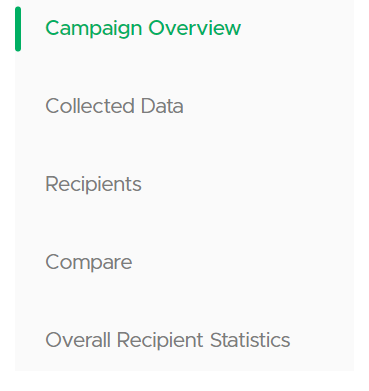
This section provides comprehensive statistical data for the campaign, offering a dashboard that presents an at-a-glance overview of campaign performance, details of data gathered during attack simulations, access to individual recipient metrics, and tools for comparing campaign outcomes and analyzing recipient data across multiple campaigns.
***
### Campaign Overview
The campaign overview presents administrators with key performance metrics at a glance, offering a concise summary of events and interactions throughout the campaign's duration.
{% tabs %}
{% tab title="Total Stats" %}
**Interpreting Total Stats**:
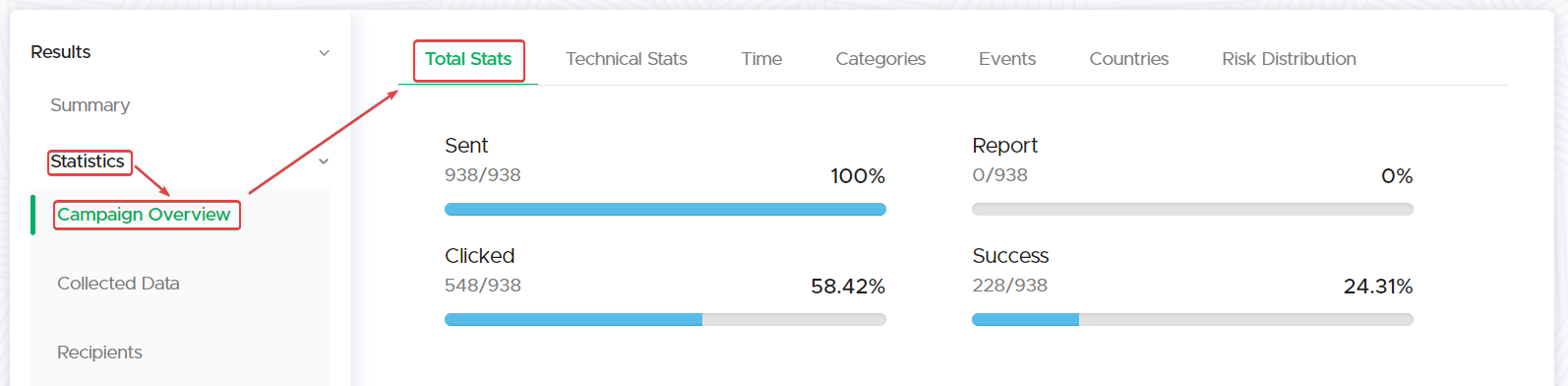
In the "Total Stats" subsection, examine the key performance indicators:
* **Sent**: This shows the total number of phishing/awareness emails/SMS messages sent and their delivery rate as a percentage.
* **Clicked**: Review the rate at which the links within the emails were clicked.
* **Report**: This metric shows the percentage of recipients who reported the phishing attempt.
* **Trained**: Indicates the percentage of recipients who completed the assigned Awareness training.
**Analyzing Graphical Data Representations**:
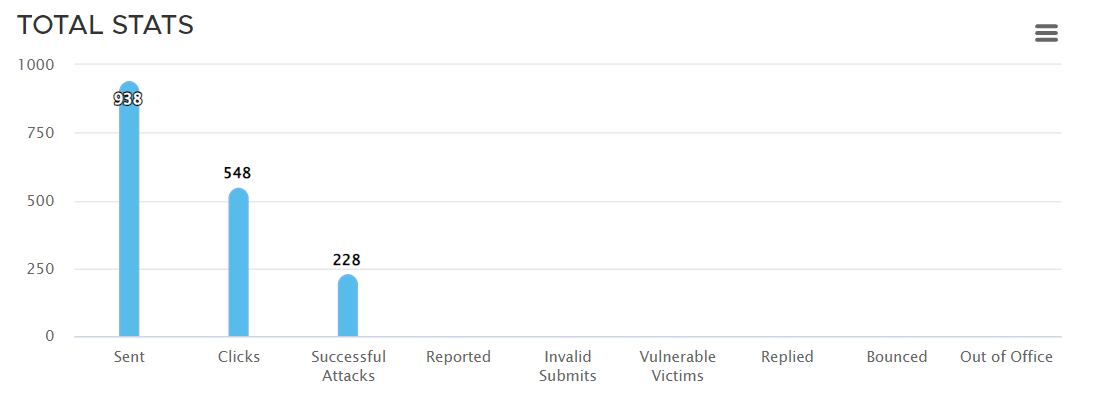
Below the statistics, refer to the bar charts for a graphical representation of the metrics.
**TOTAL STATS**:
* **Sent**: Number of emails dispatched in the campaign.
* **Clicks**: Frequency of recipients clicking on links within emails.
* **Successful Attacks**: Instances where the attack met its intended success outcome.
* **Reported**: Times the email was identified and reported as an attack by recipients.
* **Invalid Submits**: Count of submissions that were not completed successfully.
* **Vulnerable Victims**: Reflects the count of recipients who are considered to have vulnerabilities in their browser version.
* **Replied**: Responses received to the sent emails.
* **Bounced**: Emails that were not delivered to the recipient's inbox.
* **Out of Office**: Automated responses indicating the recipient is not available.
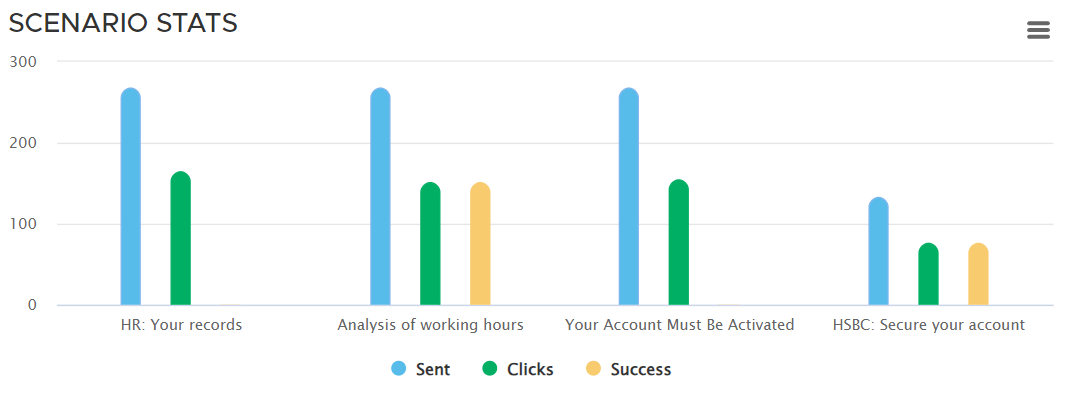
**SCENARIO STATS**:
* **Sent** (Blue bar): Emails sent for a specific scenario.
* **Clicks** (Green bar): Number of clicks recorded in a scenario.
* **Success** (Yellow bar): The success rate of the scenario in question.
{% hint style="info" %}
Hover over each bar to get detailed figures for the respective category, if the feature is supported.
{% endhint %}
{% endtab %}
{% tab title="Technical Stats" %}
**Interpreting Technical Stats**:
Technical stats can help administrators understand the technical landscape of their campaign recipients, potentially informing future campaign design and technical considerations.
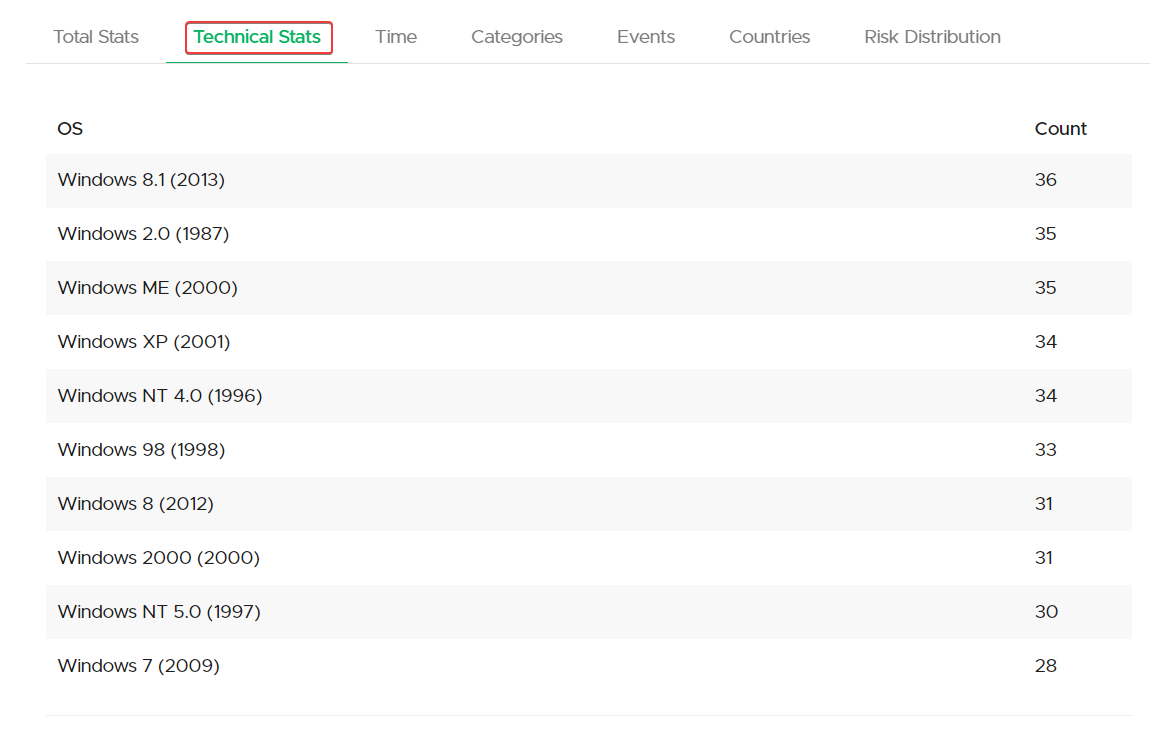
**Operating Systems (OS)**:
* Lists the variety of operating systems detected in the campaign, such as Windows 8.1, ME, XP, NT 4.0, and others, along with the year of release.
* Displays a count next to each OS, indicating the number of hits or interactions from devices using that system.
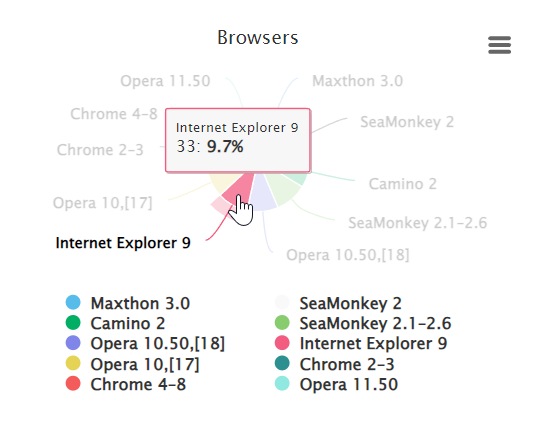
**Browsers**:
* Browsers used by the recipients, like Opera, Maxthon, SeaMonkey, and Internet Explorer, and shows the version numbers.
* Each browser entry is accompanied by a count reflecting its usage among campaign targets.
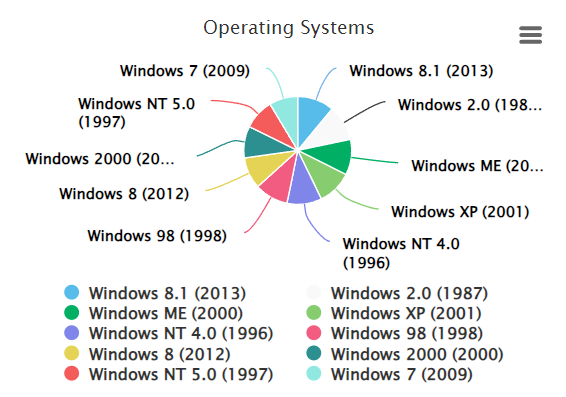
**Graphical Representations**:
* Includes radial charts for both operating systems and browsers, illustrating the distribution of user interactions by OS and browser type.
* Provides a visual comparison of the spread and diversity of operating systems and browsers engaged in the campaign.
**Extended Analysis**:
* Provides deeper technical insights into the technologies used by recipients, including scripting languages, multimedia platforms, communication protocols, and location services.
* Lists specific technologies such as VBScript, Silverlight, WebSockets, WebRTC, ActiveX, and Geolocation, offering a nuanced view of the recipient's technical environment.
{% endtab %}
{% tab title="Time" %}
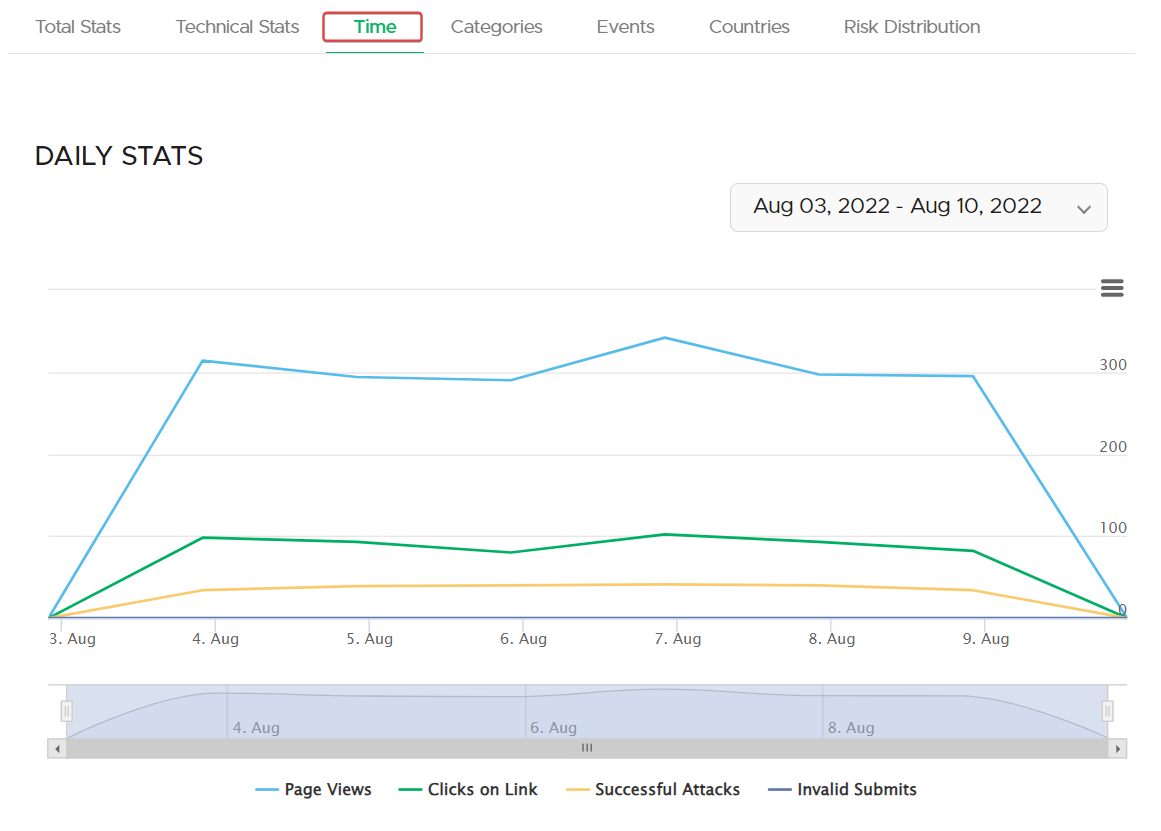
Time-based visualizations aid administrators in monitoring campaign progress and identifying peak times of engagement or vulnerability, essential for real-time adjustments and post-campaign analysis.
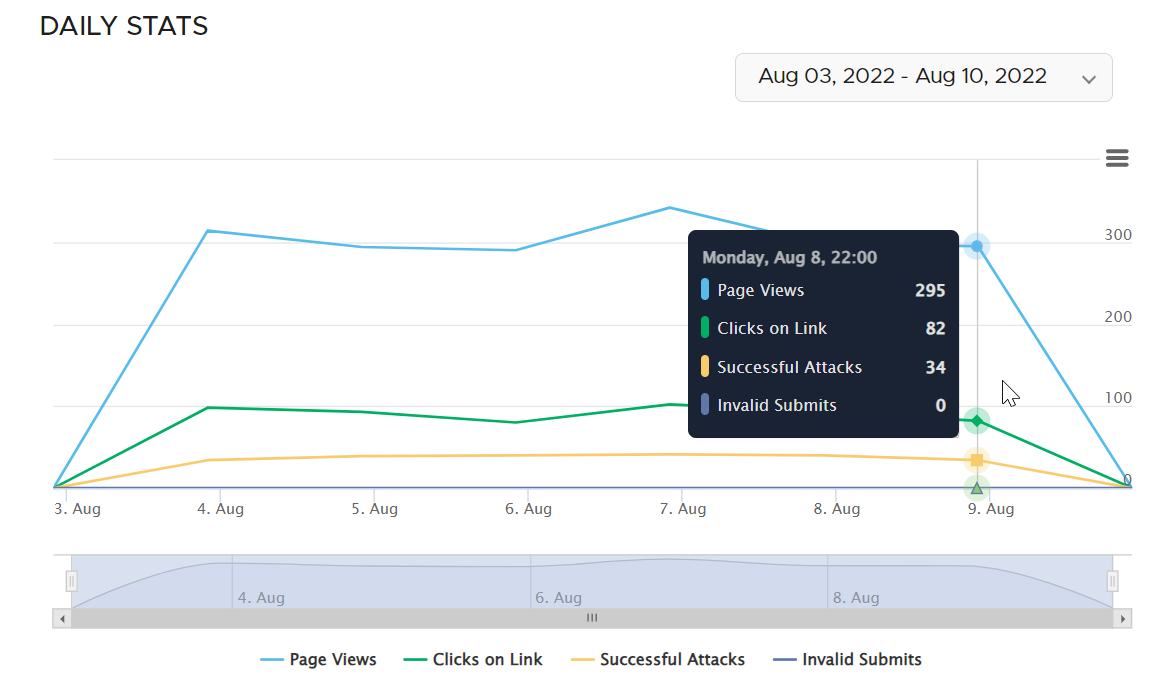
**Daily Stats**:
* Tracks and graphs campaign interactions over time, including page views, link clicks, successful attacks, and invalid submissions.
* Enables users to select a date range to focus on specific days of a campaign for detailed daily analysis.
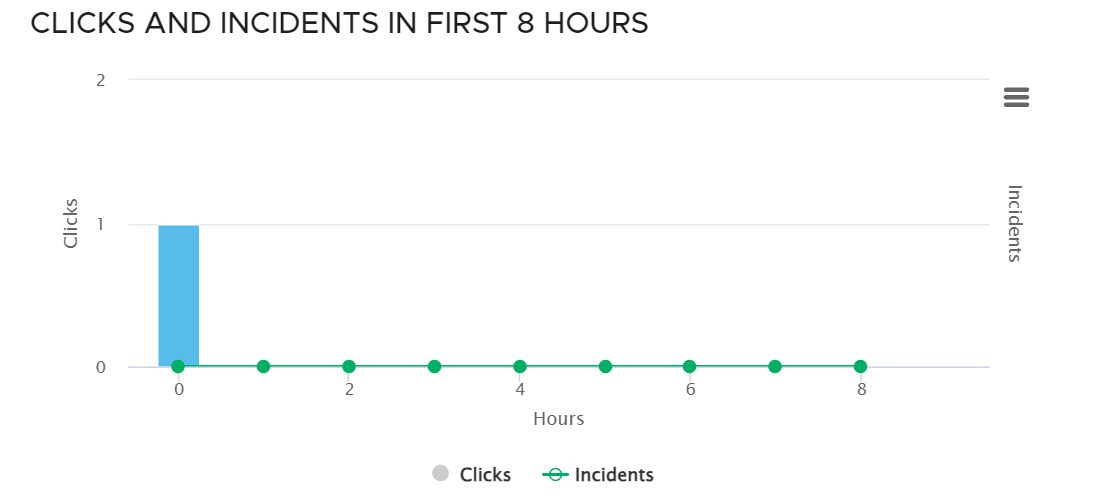
**Clicks and Incidents in First 8 Hours**:
* Displays a timeline of clicks and reported incidents within the first 8 hours post-campaign launch, crucial for understanding initial recipient reactions.
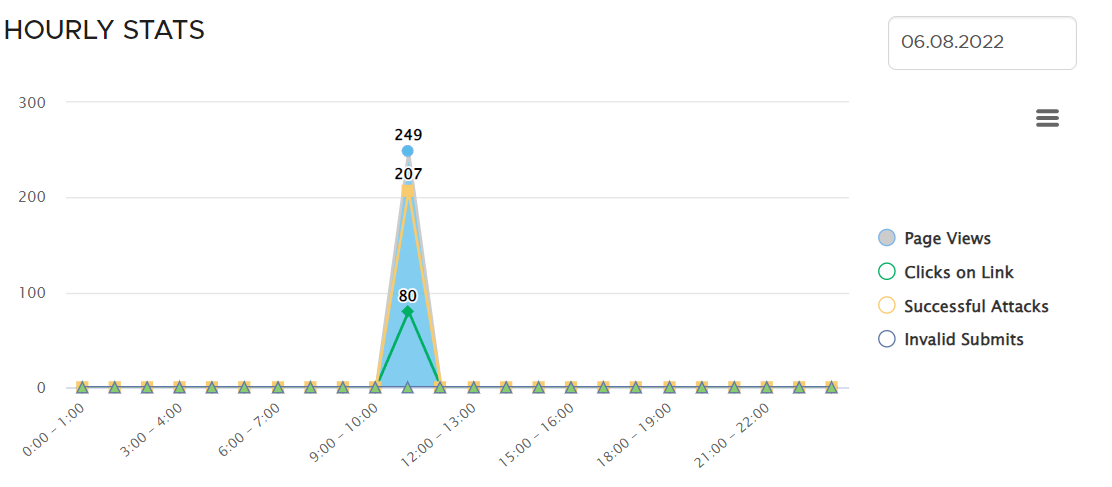
**Hourly Stats**:
* Offers an hour-by-hour breakdown of campaign metrics, such as page views, link clicks, successful attacks, and invalid submissions, providing insight into engagement patterns throughout the day.
{% endtab %}
{% tab title="Categories" %}
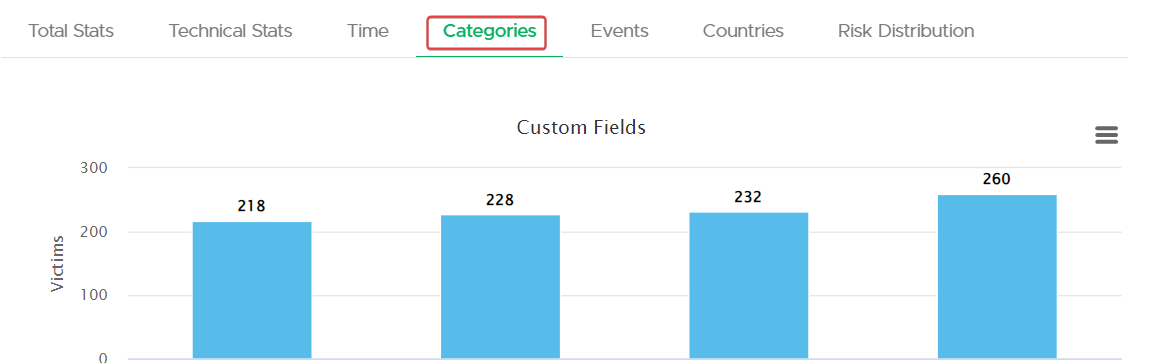
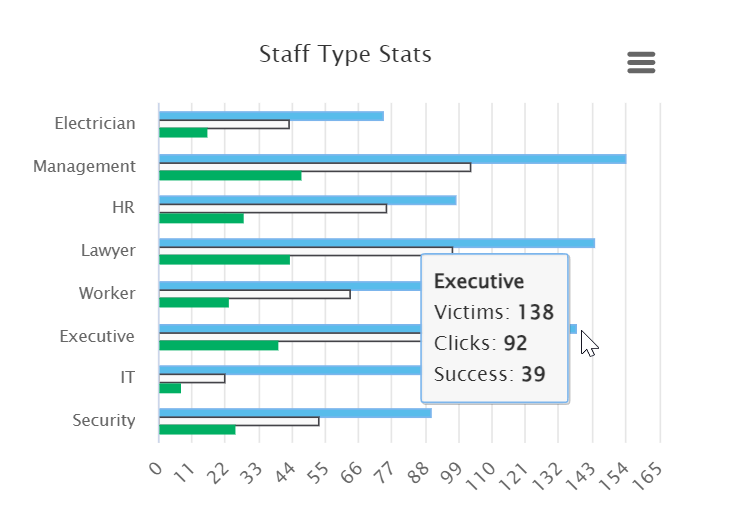
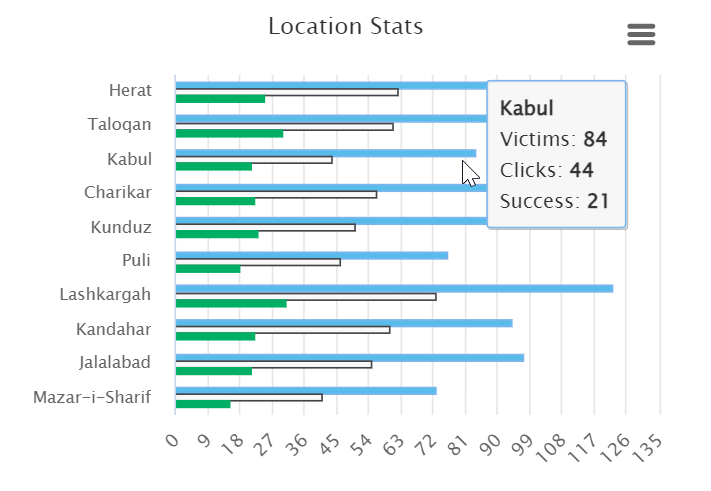
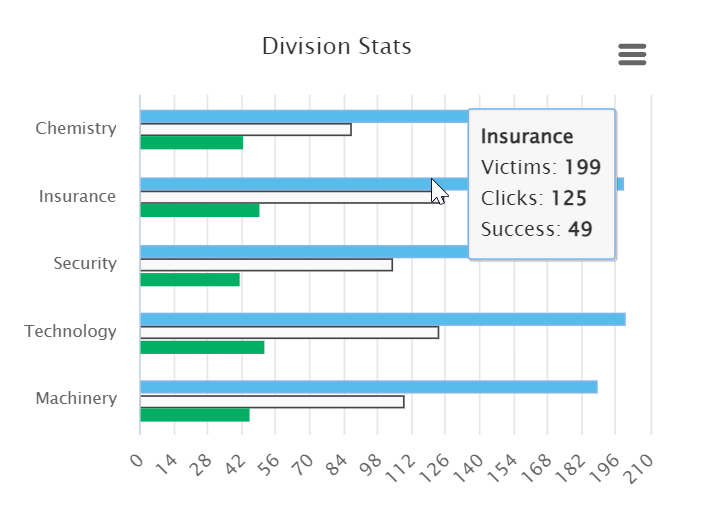
Categorical statistics help administrators identify trends and focus areas within different segments of the organization, enabling targeted follow-up and tailored security awareness initiatives.
**Custom Fields**:
* Displays bar graphs for customized data fields, quantifying recipient responses or behaviors, with counts for each category.
**Staff Type Stats**:
* Provides a horizontal bar chart breaking down engagement by staff type, such as Electricians, Management, HR, etc., to gauge response rates across different staff roles within the organization.
**Location Stats**:
* Presents a horizontal bar chart detailing the distribution of interactions by geographic location, indicating where recipients are most active or susceptible.
**Division Stats**:
* Shows a horizontal bar chart categorizing recipient actions by division allowing for an analysis of campaign impact on various organizational sectors.
{% endtab %}
{% tab title="Events" %}
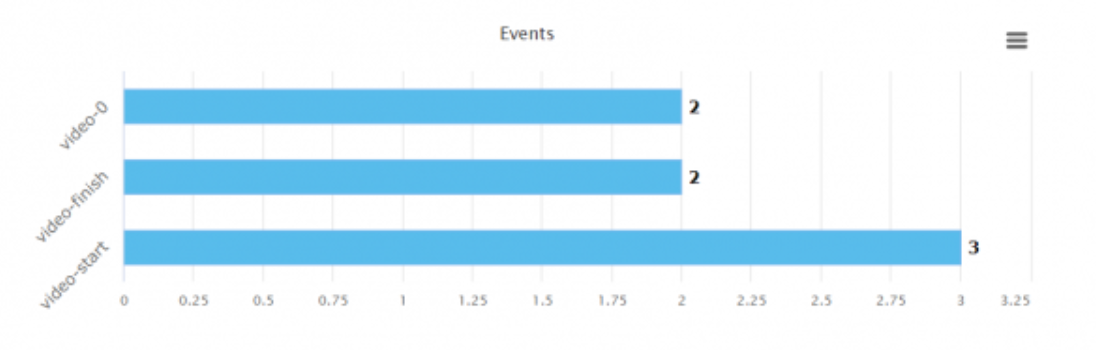
In the Events tab, administrators can monitor engagement with LUCY awareness videos through comprehensive event tracking. The system logs when a video is started, marking a "video-start" event, and upon completion, it records a "video-finish" event. Additionally, progress is tracked and displayed as rounded percentages, categorizing viewer engagement into segments such as "video-10" for 10% watched, progressing up to "video-90" for 90% and beyond.
{% endtab %}
{% tab title="Countries" %}
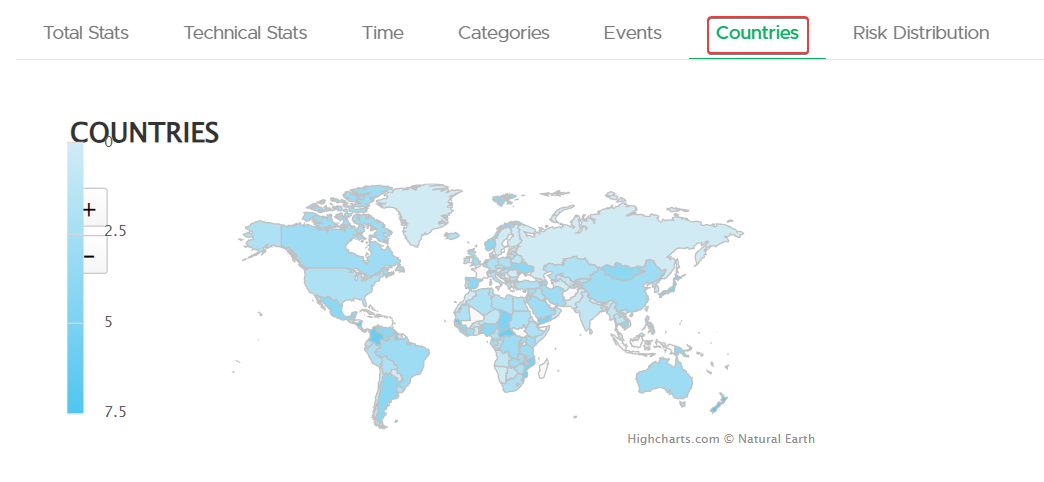
This section is designed to help administrators understand geographical trends in campaign interaction and identify areas with higher or lower engagement levels.
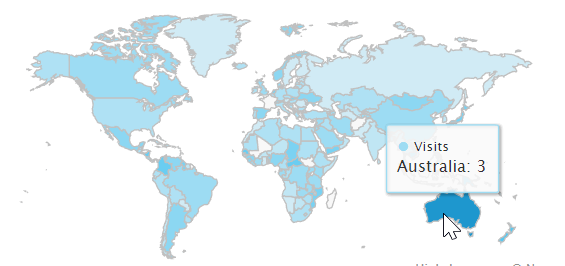
**Global Interaction Map**:
* A world map highlighting recipient interaction levels, offering visual insights into global engagement with the campaign.
**Country-Specific Statistics**:
A detailed table listing countries with corresponding metrics such as:
* **Clicks**: The number of times links were clicked within each country.
* **Success**: Instances of successful phishing simulations.
* **Reported Phishing**: The number of reports from users recognizing the phishing attempt.
* **Custom Fields**: Data columns representing additional custom metrics tailored to the campaign.
{% endtab %}
{% tab title="Risk Distribution" %}
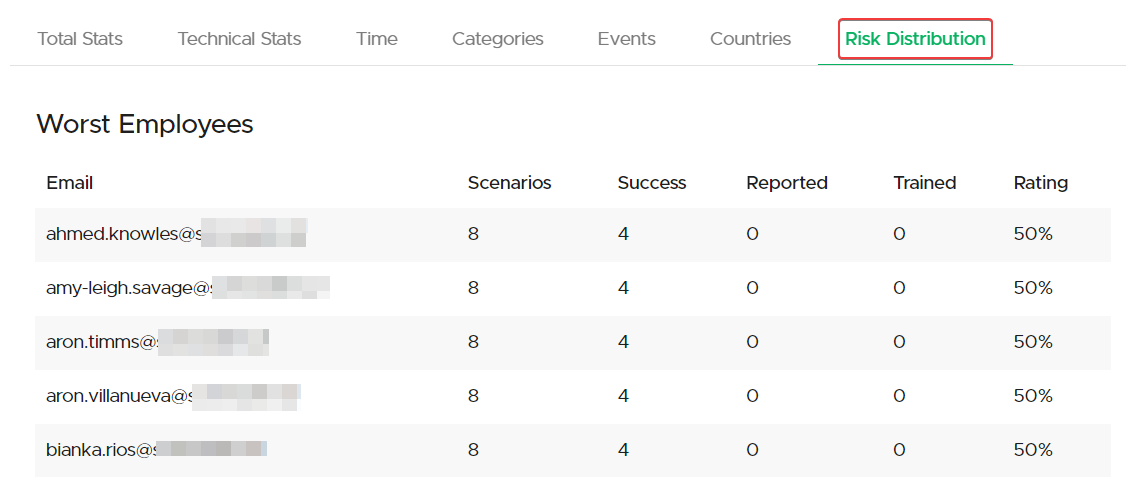
Risk distribution helps identify high-risk groups and individuals within the organization, which can help in tailoring specific training programs.
{% hint style="info" %}
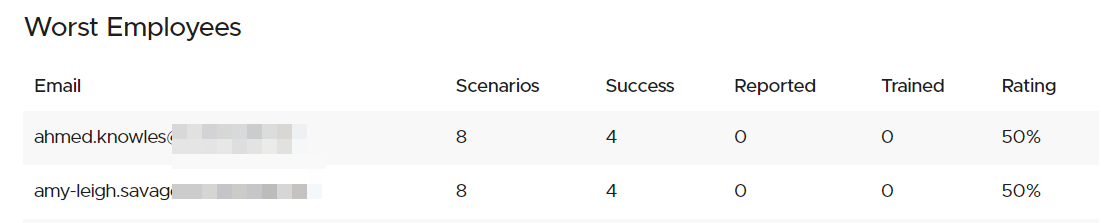
The Risk Rating for each recipient starts at 100% and takes all previous campaigns into account, this rating is reflective of each recipient's overall susceptibility to phishing simulations.\
\
Risk Rating is reduced proportionally based on their interaction with phishing simulations; for instance, if a recipient falls for 1 out of 4 simulations, their rating would drop by 25%, resulting in a 75% Risk Rating.
{% endhint %}
**Worst Employees**:
* Lists individual emails alongside the number of scenarios they were involved in, the count of successful attacks, if they reported the attack, their training status, and an overall risk rating percentage.
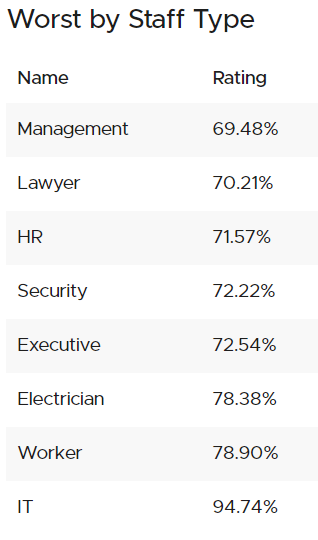
**Worst by Staff Type**:
* Ranks staff types by risk rating, providing a percentage that indicates susceptibility to the simulated attacks.
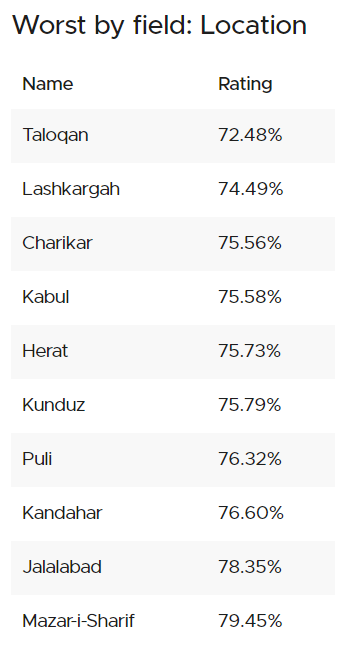
**Worst by Field: Location**:
* Displays locations with their corresponding risk ratings, identifying areas with higher susceptibility to phishing attacks.
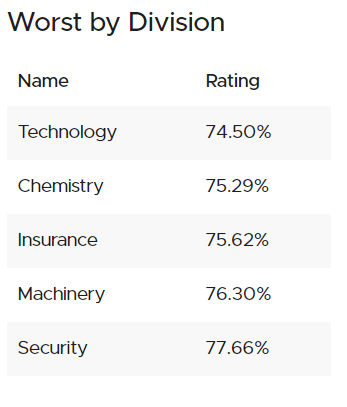
**Worst by Division**:
* Shows divisions within the organization ranked by their risk rating percentages, highlighting divisions that may require additional security awareness training.
{% hint style="warning" %}
A lower Risk Rating reflects poorer performance, indicating a higher susceptibility to phishing among recipients, groups, divisions, locations, or staff categories.
{% endhint %}
{% endtab %}
{% tab title="Awareness Website" %}
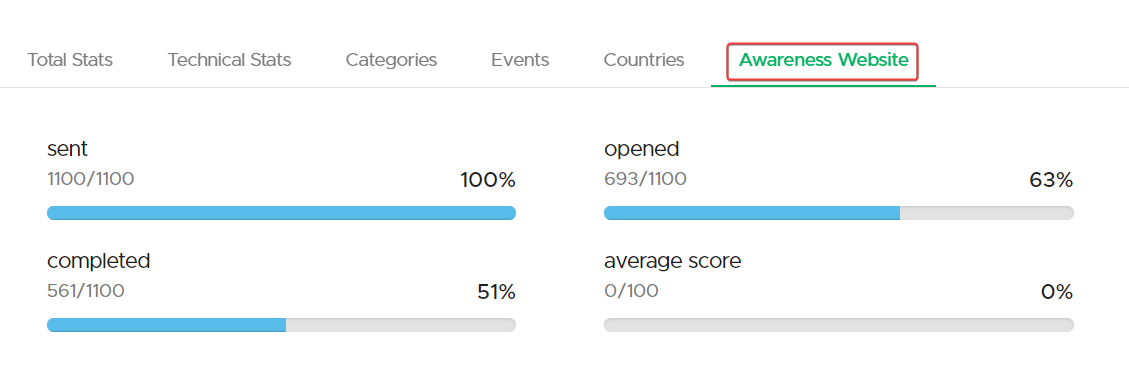
In the "Awareness Website" tab, administrators can access a variety of metrics providing insight into the interaction with awareness training content.
{% hint style="info" %}
The Awareness Website tab will only be displayed in campaigns with awareness training.
{% endhint %}
Metrics at the top indicate the number of awareness emails sent, opened, and the completion rate, along with the average score achieved by recipients.
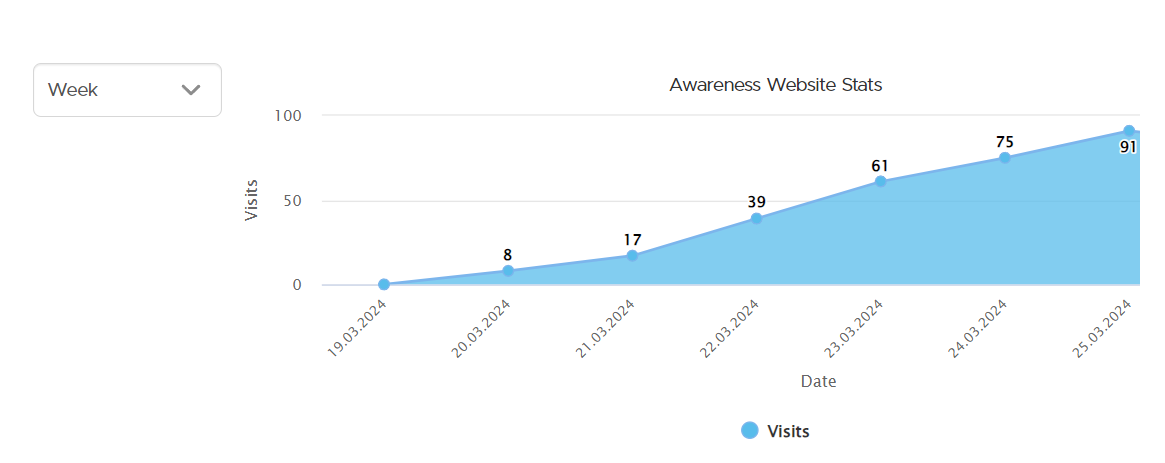
The "Awareness Website Stats" chart shows the number of visits over a selectable time period, offering a view of user engagement over time.
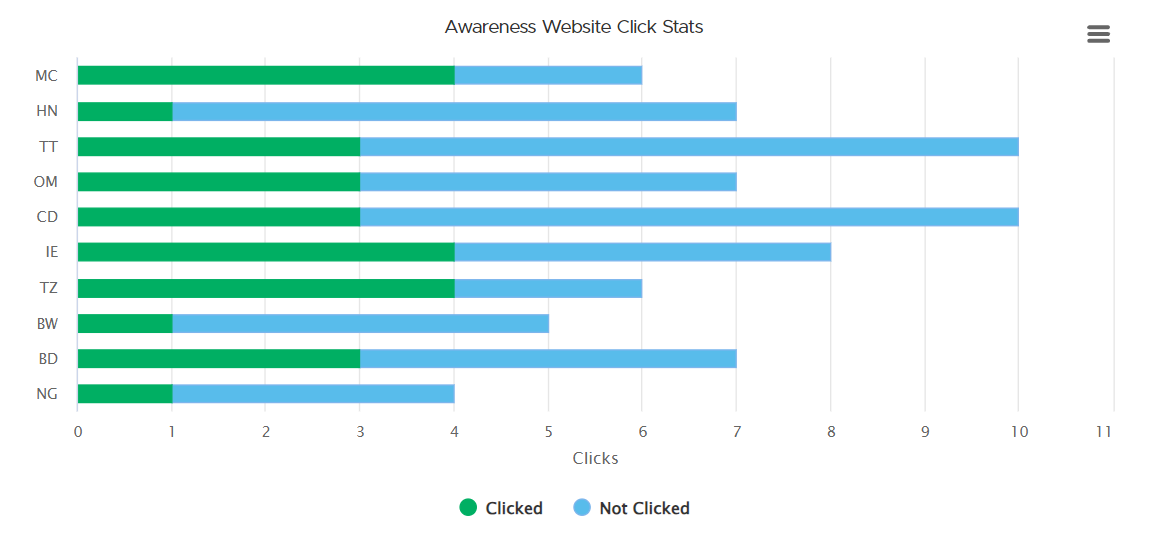
"Awareness Website Click Stats" bar graph illustrates the number of clicks versus not clicked, highlighting whether the recipient clicked the link to go to the training content.
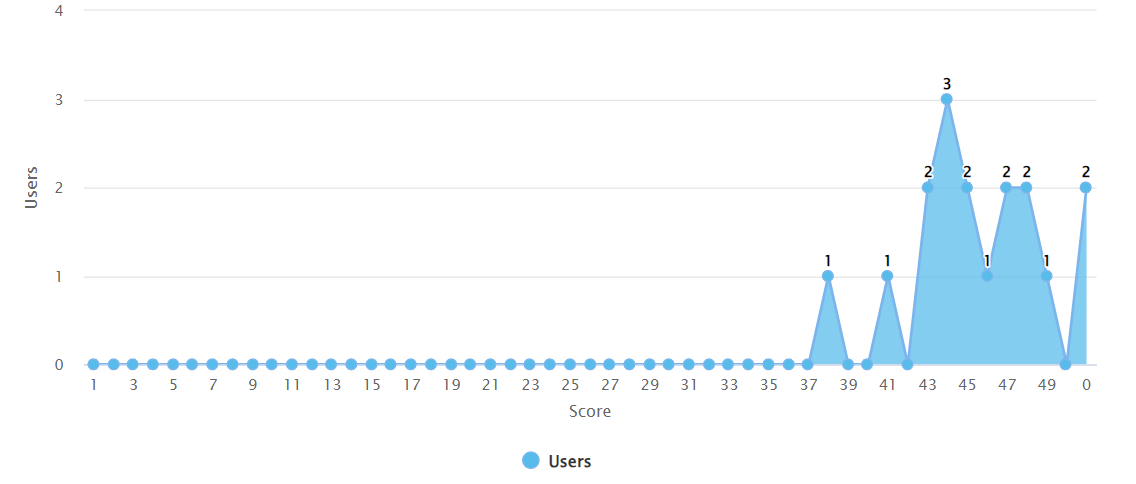
The "Quiz Scores Distribution" graph displays user performance across different score ranges, allowing administrators to gauge the overall effectiveness of the training.
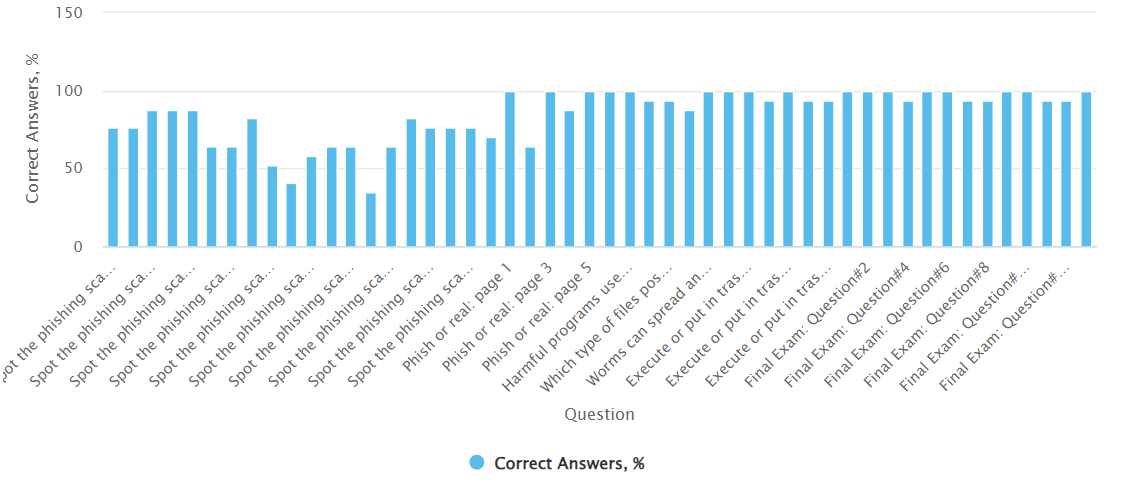
"Quiz Correct Answers Percent" showcases the percentage of correct responses to each quiz question, indicating areas where recipients may need further education.
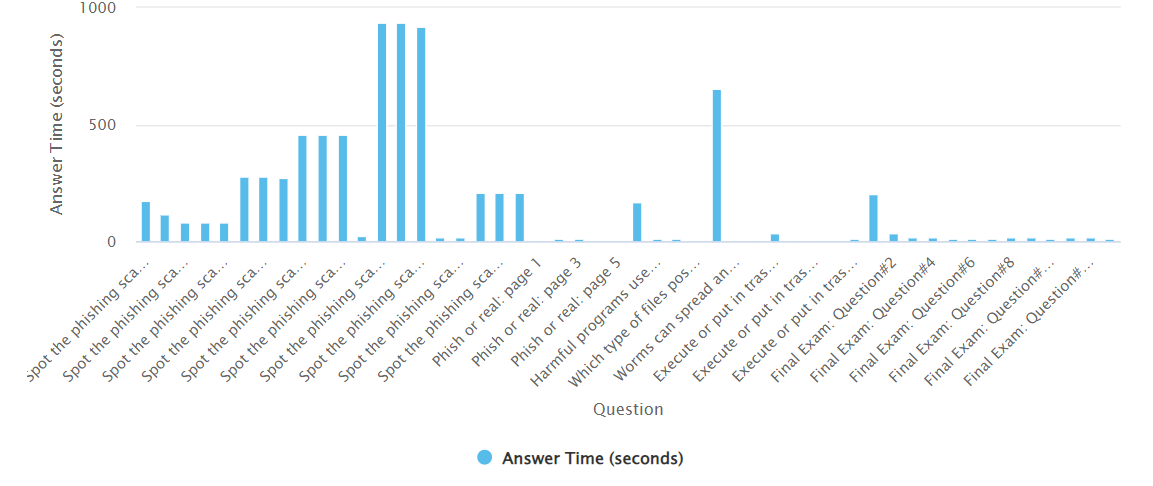
"Quiz Average Answer Time" presents the time taken to answer each question, providing insight into question difficulty or recipient uncertainty.
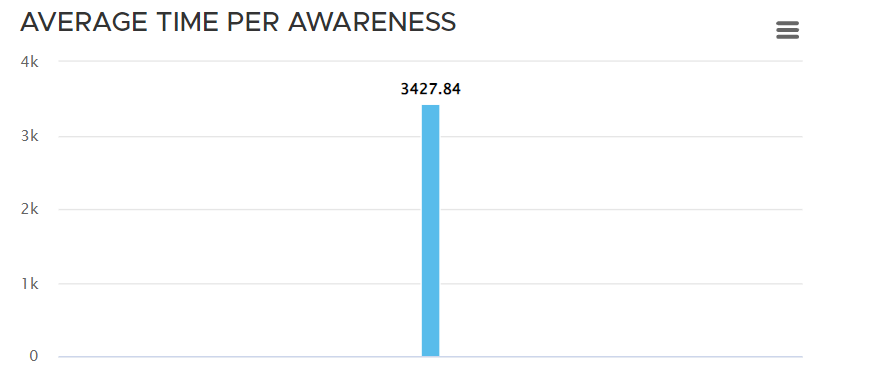
Two additional bar charts detail the average time spent per awareness training and per page, reflecting engagement depth and content complexity.
{% endtab %}
{% endtabs %}
***
### Collected Data
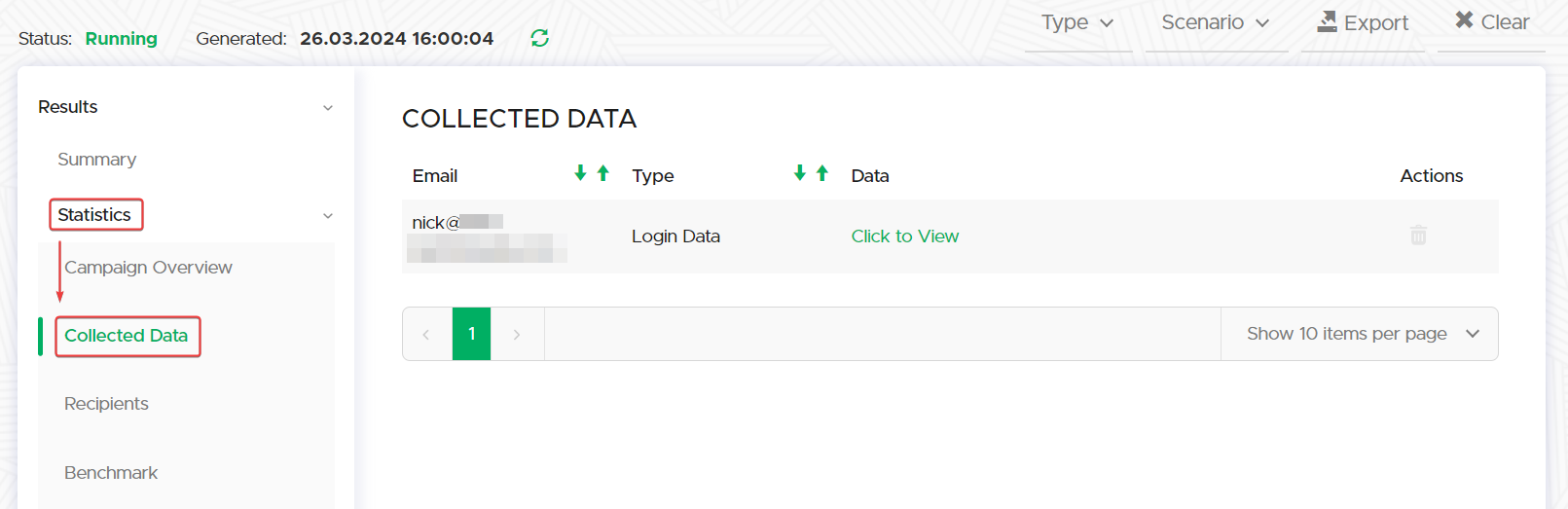
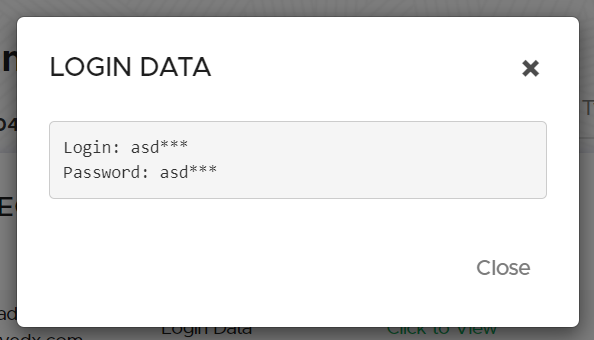
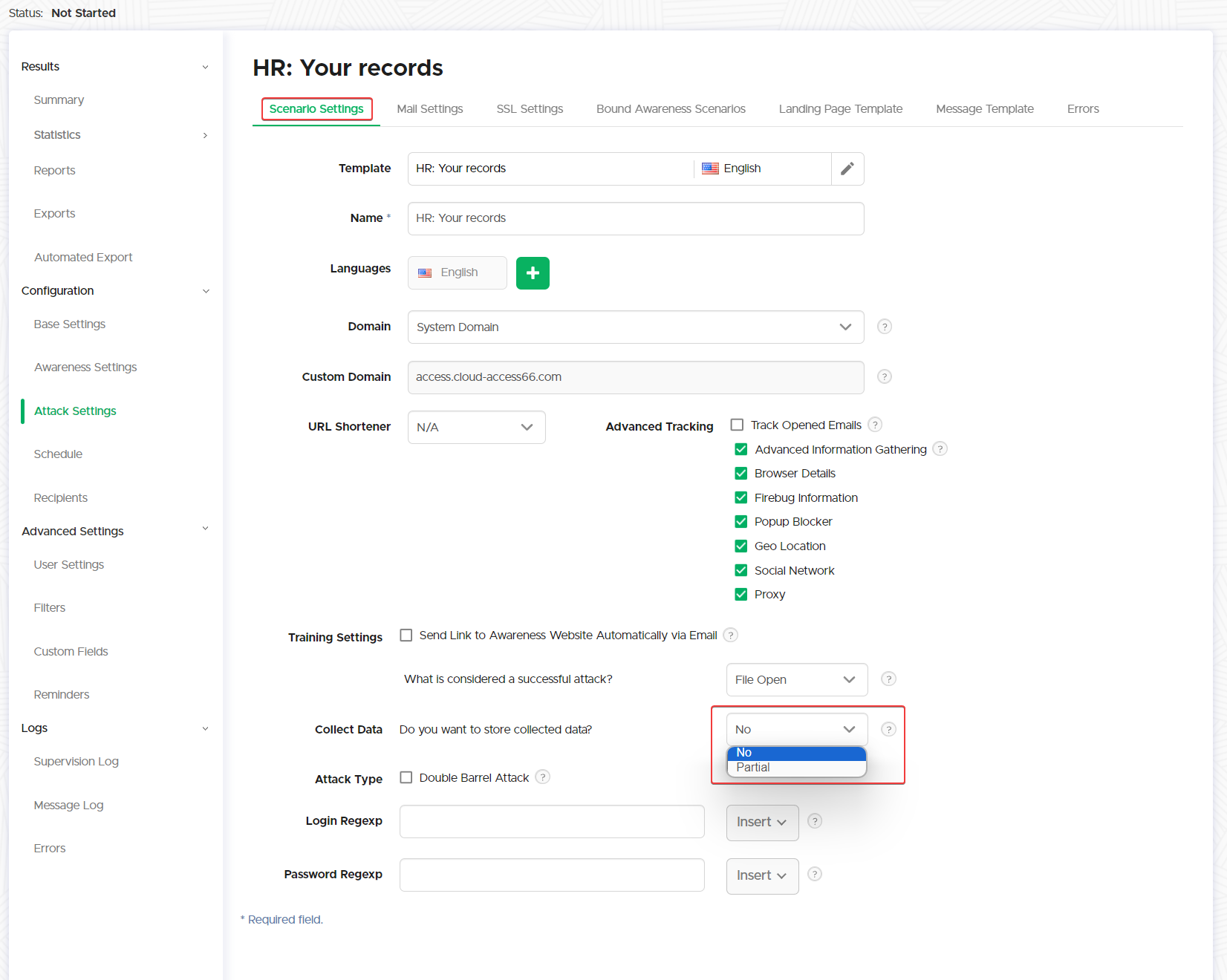
Collected data encompasses information gathered from web-based phishing simulations, including credentials entered on a fake login page or data transmitted to LUCY from simulated document macros activated by users.
Each entry will be listed below. To view the collected data, select 'Click to View.'
{% hint style="warning" %}
Lucy collects only partial data to comply with data regulations, revealing the first three characters of usernames and passwords.
{% endhint %}
{% tabs %}
{% tab title="Type" %}
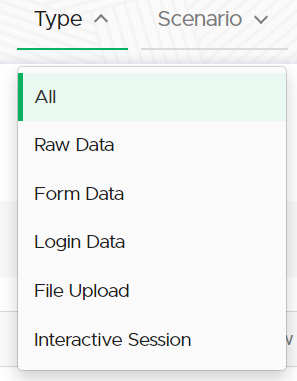
This dropdown allows users to filter the displayed data based on the category it falls under.
* **All**: Displays all types of collected data without any filters.
* **Raw Data**: Shows unprocessed data exactly as it was captured.
* **Form Data**: Filters to show data entered into forms within Lucy, like registration or feedback forms.
* **Login Data**: Reveals data related to user login credentials, typically restricted to partial information for privacy.
* **File Upload**: Lists data on files uploaded by the [Technical Malware](/guides/attack-simulations/attack-types/technical-malware-test.md) test.
* **Interactive Session**: Displays data from sessions that involve user interaction, possibly including real-time engagements and their details.
{% endtab %}
{% tab title="Scenario" %}
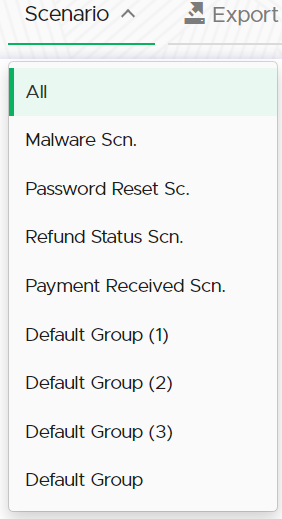
The "Scenario" dropdown menu in the "Collected Data" tab allows administrators to filter the collected data based on different scenarios within the campaign.
{% endtab %}
{% tab title="Export" %}
Exporting the Collected data will provide an administrator with either a csv or xml, specifying the following metrics:
{% endtab %}
{% tab title="Clear" %}
This option allows an administrator to clear all collected data.
{% hint style="warning" %}
Once data has been cleared, it becomes irretrievable.
{% endhint %}
{% endtab %}
{% endtabs %}
***
### Recipients
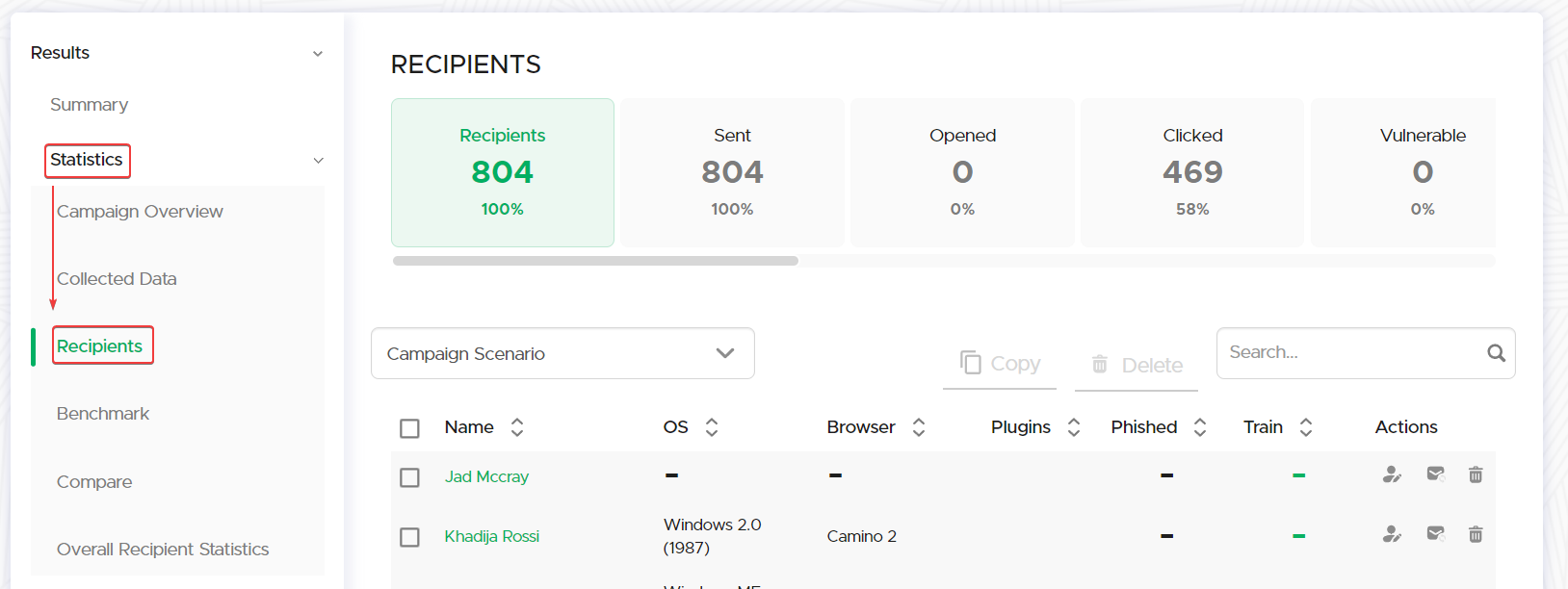
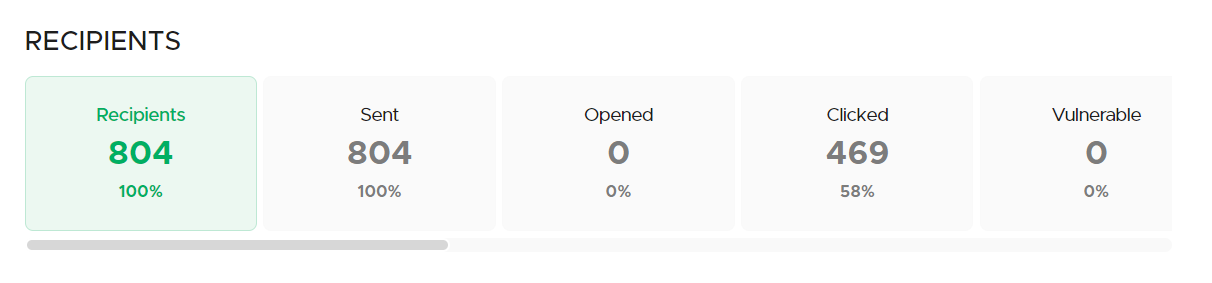
The Recipients Statistics page offers administrators a comprehensive overview of individual recipient outcomes, furnishing granular metrics on each participant's engagement with the campaign.
#### Overview of all recipient statistics:
{% tabs %}
{% tab title="Recipients" %}
The total number of individuals targeted in the campaign.
{% endtab %}
{% tab title="Sent" %}
The total emails that were successfully dispatched to recipients.
{% endtab %}
{% tab title="Opened" %}
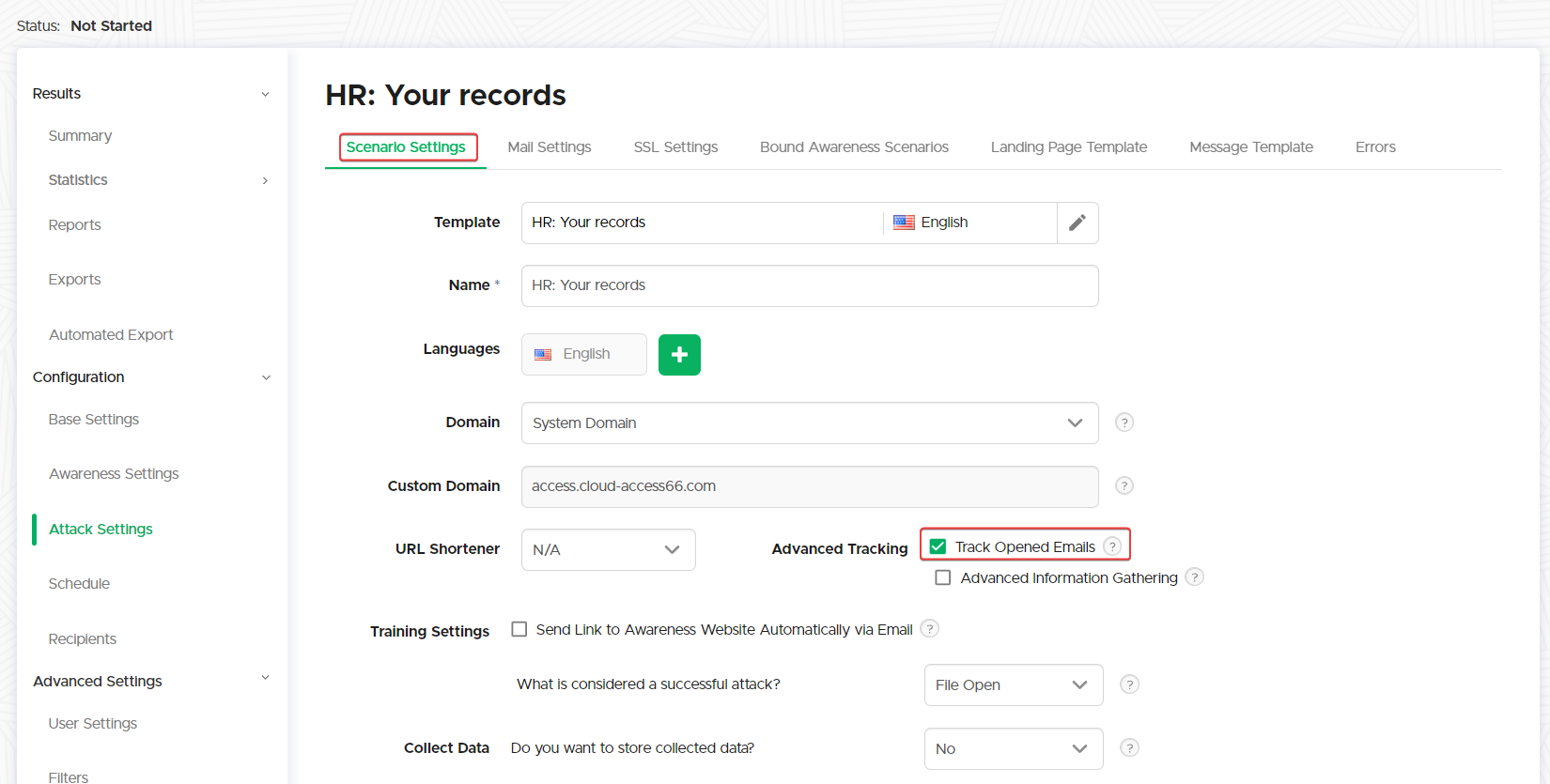
Recipients who opened the email.
{% hint style="warning" %}
"Tracked Opened Emails" needs to be enabled on the Scenario Settings.
{% endhint %}
{% endtab %}
{% tab title="Clicked" %}
Recipients who clicked on a link within the email.
{% endtab %}
{% tab title="Vulnerable" %}
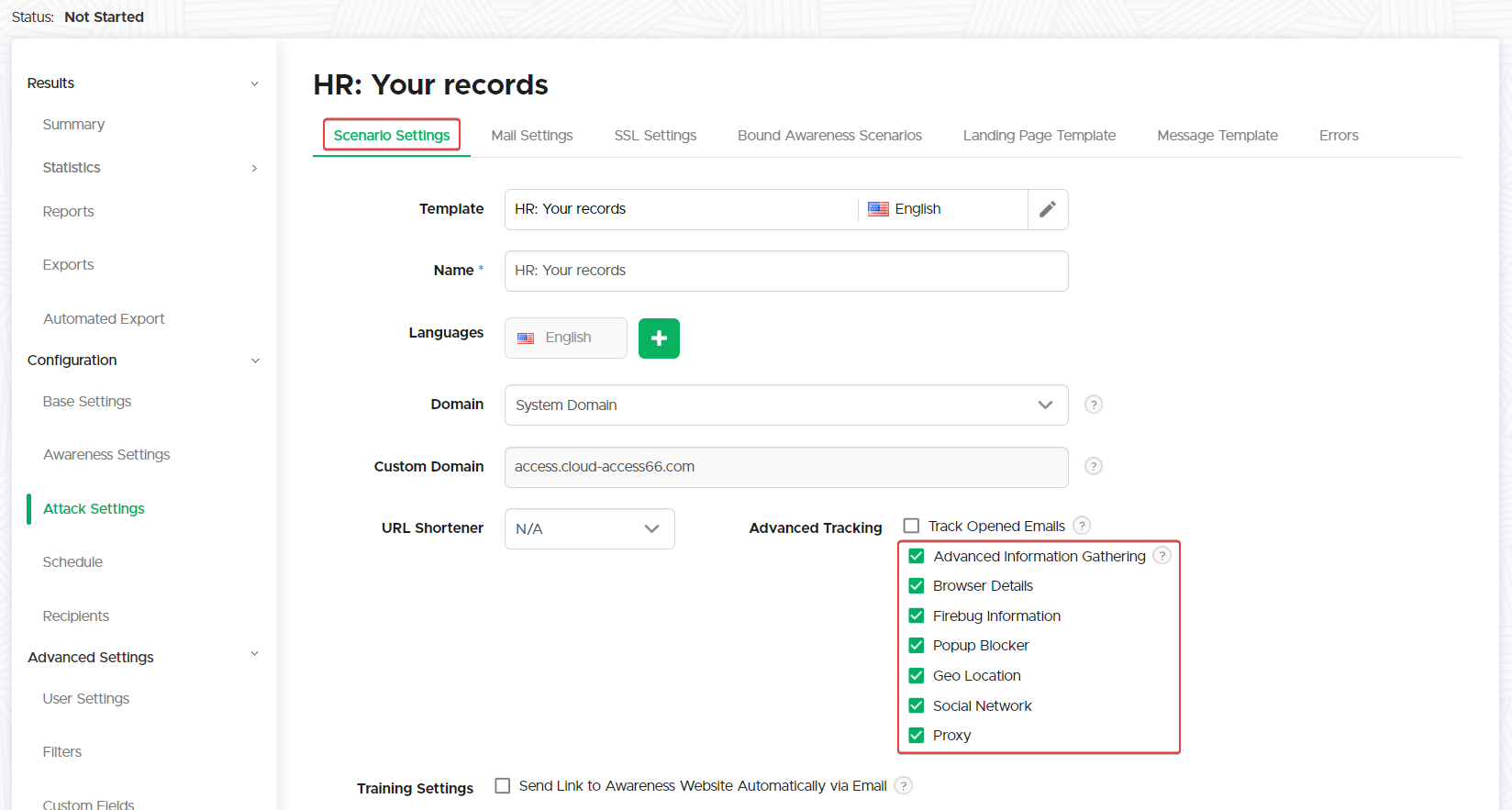
The number of recipients who are considered to have vulnerabilities in their browser version.
{% hint style="warning" %}
"Advanced Information Gathering" needs to be enabled on the Scenario Settings.
{% endhint %}
{% endtab %}
{% tab title="File Downloaded" %}
Instances where a recipient downloaded a file.
{% endtab %}
{% tab title="Data Submitted" %}
Cases where recipients entered data on a simulated phishing page.
{% endtab %}
{% endtabs %}
{% tabs %}
{% tab title="Succeeded" %}
Recipients who completed the desired success action of the phishing simulation.
{% hint style="warning" %}
The success action is defined for each scenario on the Scenario Settings of the campaign.
{% endhint %}
{% endtab %}
{% tab title="Training Succeeded" %}
Recipients who successfully completed the associated training module.
{% endtab %}
{% tab title="Rescheduled" %}
The amount of recipients that opted to reschedule the training.
{% hint style="warning" %}
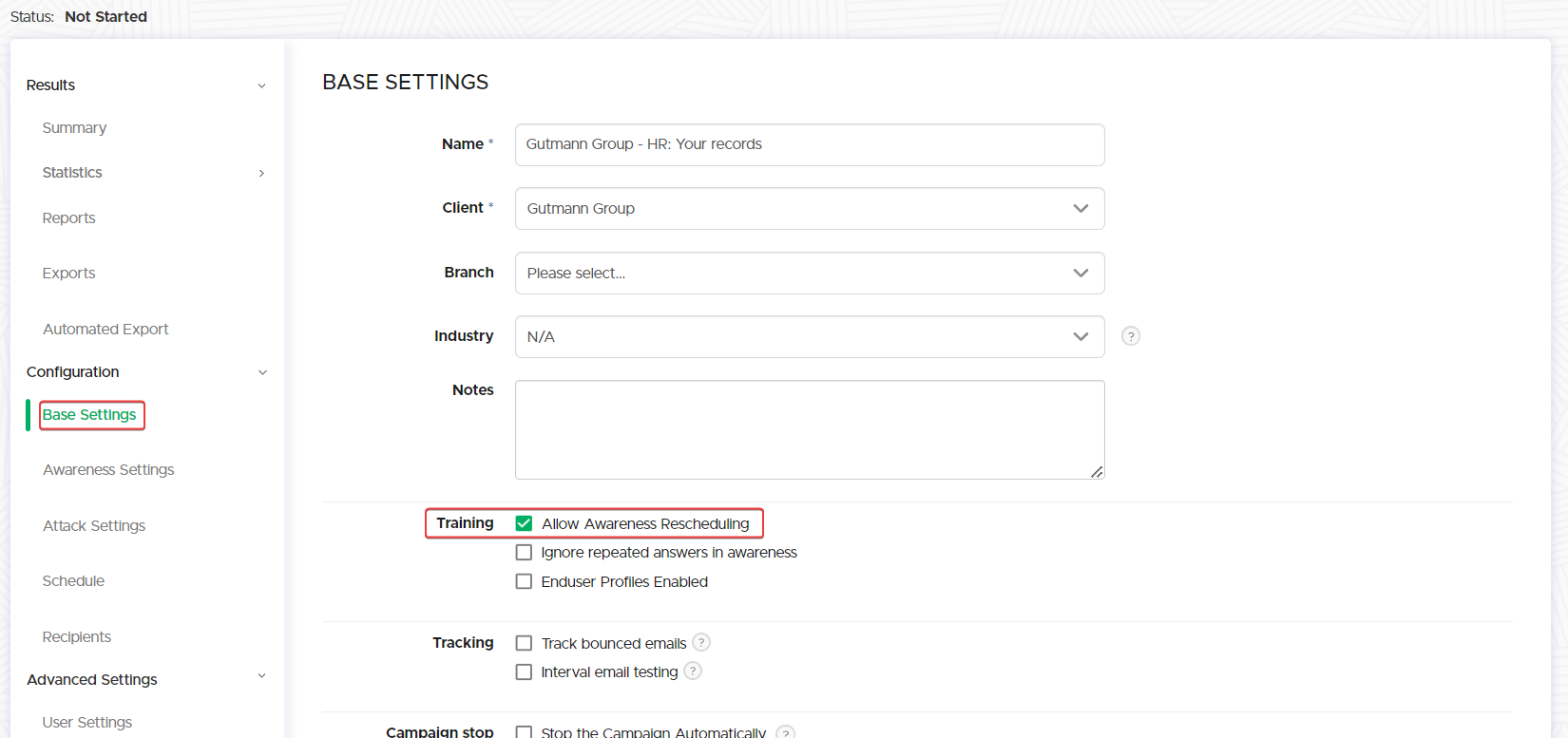
"Allow Awareness Rescheduling" needs to be enabled on the Base Settings of the campaign.
{% endhint %}
{% endtab %}
{% tab title="Out of Office" %}
Auto-replies indicating the recipient is out of the office.
{% hint style="warning" %}
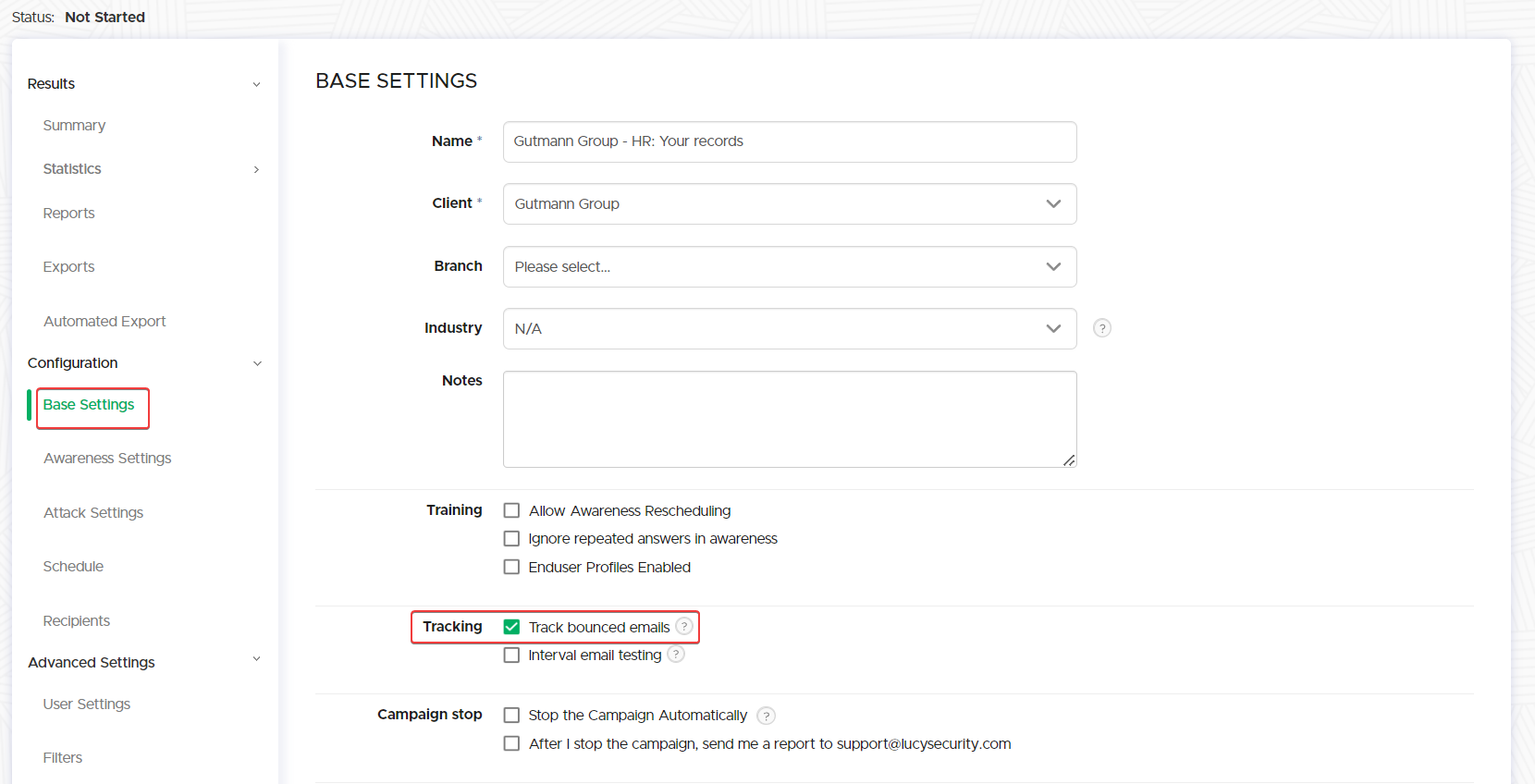
"Tracked Bounced Emails" needs to be selected on the Base Settings of the campaign.
{% endhint %}
{% hint style="info" %}
Further behavioral configuration can be done in **Settings -> Submitted Email Settings -> Automated Response Detection**
{% endhint %}
{% endtab %}
{% tab title="Bounced" %}
Emails that failed to deliver.
{% hint style="warning" %}
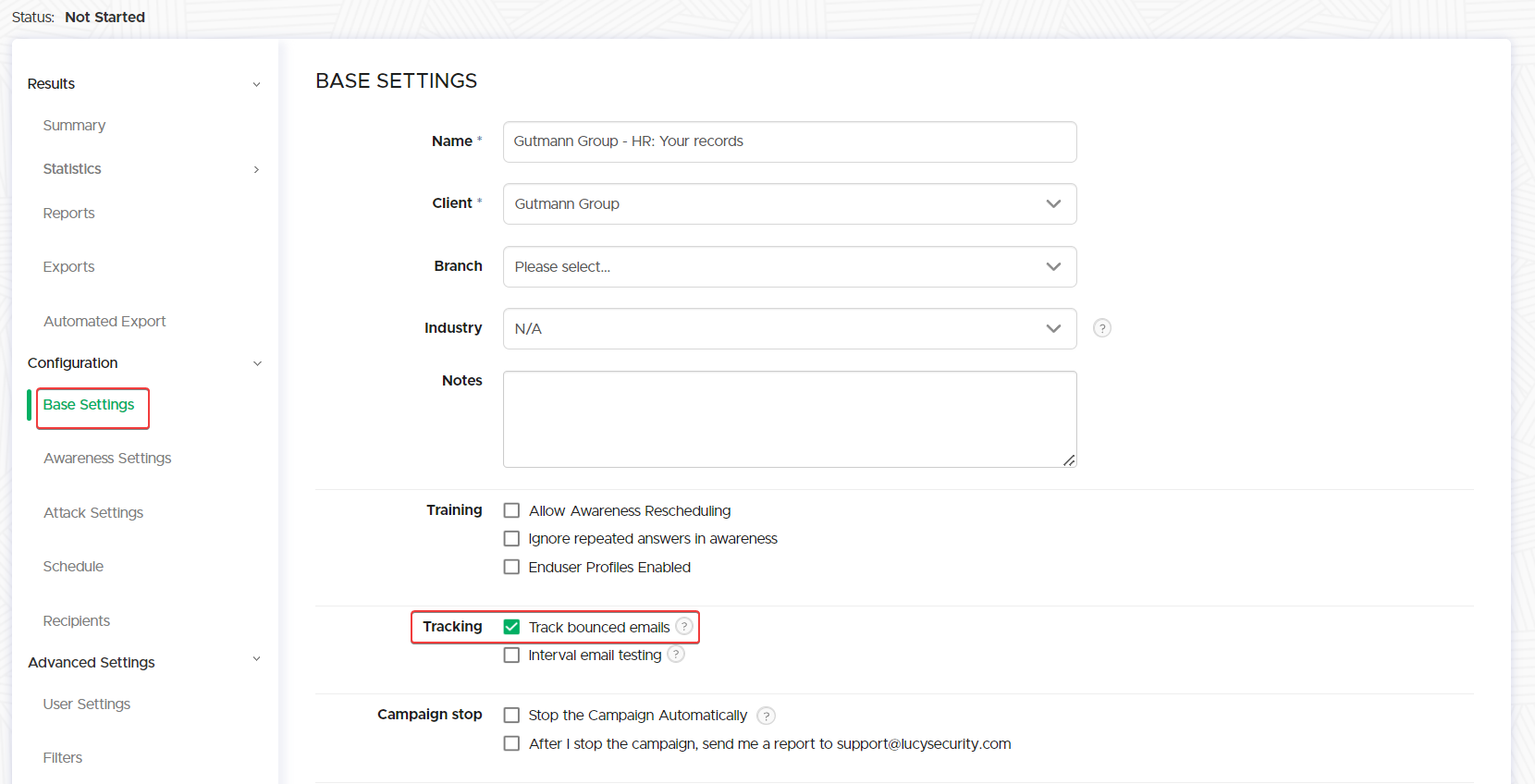
"Tracked Bounced Emails" needs to be selected on the Base Settings of the campaign.
{% endhint %}
{% hint style="info" %}
Further behavioral configuration can be done in **Settings -> Submitted Email Settings -> Automated Response Detection**
{% endhint %}
{% endtab %}
{% tab title="Responded" %}
Recipients who replied to the email.
{% hint style="info" %}
The system is configured to intercept all emails directed to the sender's email address and associated domain. Thus, the sender's email domain's MX records must be set to this Lucy server, and as a result, no emails from the Lucy Server can be delivered to addresses within that domain if they are listed as recipients.
{% endhint %}
{% endtab %}
{% endtabs %}
#### Detailed Recipient Statistics
In the following section, an administrator can obtain detailed data on each recipient's specific interactions within the campaign.
Navigating through recipient statistics
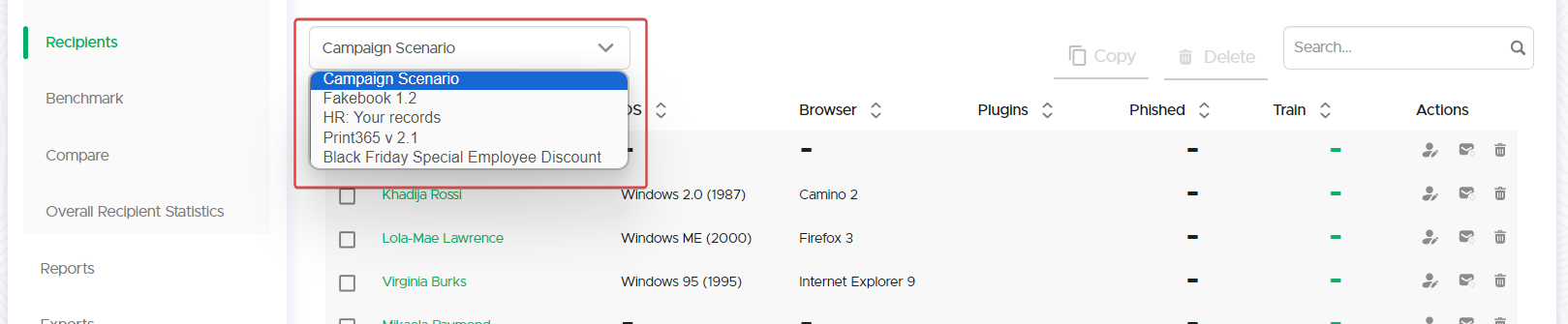
From the dropdown, an administrator can isolate recipients by Scenarios:
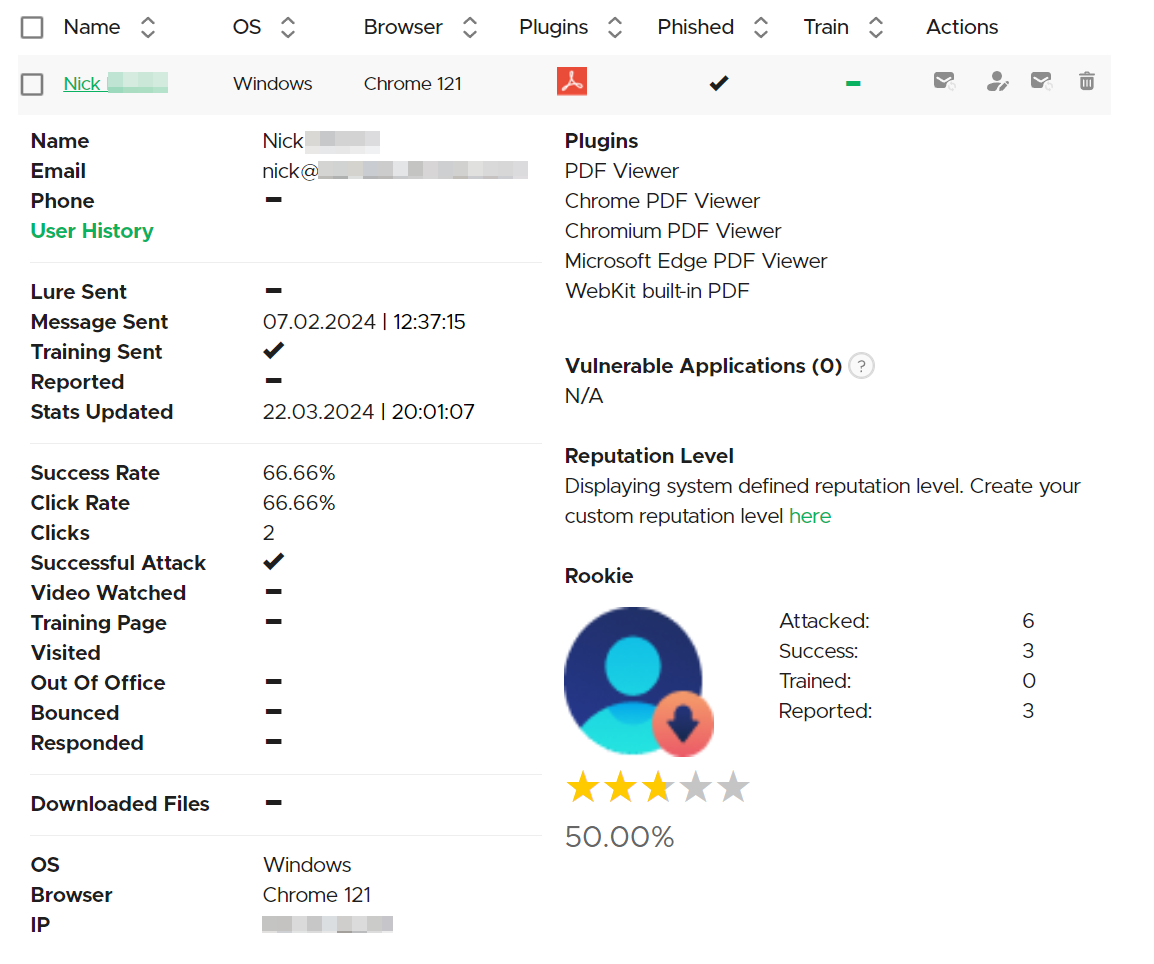
* **Name**: Lists the names of the individuals targeted in the phishing campaign scenario.
* **OS**: Shows the operating system of the recipient's device, including the version and release year.
* **Browser**: Indicates the web browser used by the recipient, along with the version.
* **Plugins**: Lists any browser plugins detected on the recipient's device.
* **Phished**: A checkmark represents whether the recipient was successfully phished.
* **Train**: Indicates whether the recipient has completed the associated cybersecurity training.
* **Actions**: This column includes icons for actions that can be taken for each recipient, such as editing, manually updating the statistics, or deleting a recipient.
Each recipient has quick actions available, enabling you to download the training certificate, resend the email, edit recipient details, or update the recipient's statistics.
{% hint style="info" %}
Click on the recipient's name to gather detailed statistics.
{% endhint %}
Recipient Profile
* **Name**: The recipient's full name.
* **Email**: Their email address.
* **Phone**: The recipient's phone number.
* **User History**: Includes a log of all interactions with the campaigns.

Campaign Interaction Details
* **Lure Sent**: Status of [phishing lure](/guides/attack-simulations/attack-types/lures.md) sent to the recipient.
* **Message Sent**: Confirmation of the campaign message being sent.
* **Training Sent**: Indicates if the awareness training was sent.
* **Reported:** Status if the recipient had reported the simulated email.
* **Stats Updated**: Timestamp of the last update to the recipient's statistics.
Engagement Metrics
* **Success Rate**: Percentage of successful phishing attempts.
* **Click Rate**: Percentage of links clicked by the recipient.
* **Successful Attack**: Count of successful phishing attempts.
* **Training Page Visited**: Indicates if the recipient visited the training page.
Reputation Level
Visual indicator of the recipient's susceptibility to phishing attempts, which can be customized.
---
# Agent Instructions
This documentation is published with GitBook. GitBook is the documentation platform designed so that both humans and AI agents can read, navigate, and reason over technical content effectively. Learn more at gitbook.com.
## Querying This Documentation
If you need additional information that is not directly available in this page, you can query the documentation by asking a question.
Perform an HTTP GET request on the following URL with the `ask` and `goal` query parameters:
```
GET https://wiki.lucysecurity.com/application-reference/campaigns/campaign-settings/results/statistics.md?ask=&goal=
```
`ask` is the immediate question: it should be specific, self-contained, and written in natural language.
`goal` is what the user is ultimately trying to achieve, the reason they need the answer. Sharing it helps GitBook give you a better, more relevant answer. A goal is most helpful when it describes the outcome the user wants rather than restating the question. For example, with `ask=how do I create an API token`, a goal like `automate deployments from our CI pipeline` lets GitBook tailor the answer to that use case.
The response will contain a direct answer to the question and relevant excerpts and sources from the documentation.
Use this mechanism when the answer is not explicitly present in the current page, you need clarification or additional context, or you want to retrieve related documentation sections.

 * **Name**: Lists the names of the individuals targeted in the phishing campaign scenario.
* **OS**: Shows the operating system of the recipient's device, including the version and release year.
* **Browser**: Indicates the web browser used by the recipient, along with the version.
* **Plugins**: Lists any browser plugins detected on the recipient's device.
* **Phished**: A checkmark represents whether the recipient was successfully phished.
* **Train**: Indicates whether the recipient has completed the associated cybersecurity training.
* **Actions**: This column includes icons for actions that can be taken for each recipient, such as editing, manually updating the statistics, or deleting a recipient.
* **Name**: Lists the names of the individuals targeted in the phishing campaign scenario.
* **OS**: Shows the operating system of the recipient's device, including the version and release year.
* **Browser**: Indicates the web browser used by the recipient, along with the version.
* **Plugins**: Lists any browser plugins detected on the recipient's device.
* **Phished**: A checkmark represents whether the recipient was successfully phished.
* **Train**: Indicates whether the recipient has completed the associated cybersecurity training.
* **Actions**: This column includes icons for actions that can be taken for each recipient, such as editing, manually updating the statistics, or deleting a recipient.