> For the complete documentation index, see [llms.txt](https://wiki.lucysecurity.com/llms.txt). Markdown versions of documentation pages are available by appending `.md` to page URLs; this page is available as [Markdown](https://wiki.lucysecurity.com/application-reference/templates/awareness-templates.md).
# Awareness Templates
### Introduction
Awareness training through LUCY helps reduce susceptibility to phishing and malware by educating users about their risks. The platform offers:
* Computer-based training accessible from any location.
* Short, modular, customizable videos suitable for multi-session completion.
* Tailored training topics and layouts for specific audiences.
* Supplementary materials to reinforce training.
* Multi-language support to ensure consistency across geographies.
* Quizzes to assess learner comprehension.
* Completion reports for compliance tracking.
{% hint style="warning" %}
Awareness training may use cookies for progress tracking.
{% endhint %}
***
{% hint style="info" %}
Navigate to **Templates -> Awareness Templates**
{% endhint %}
### Awareness Template Variations
LUCY provides a variety of ready-to-use e-learning templates, which are continually updated. These templates include rich media options like videos and interactive elements to enhance engagement.
{% tabs %}
{% tab title="Games" %}
Gamification in cybersecurity awareness training incorporates interactive challenges and rewards to engage participants, making learning about security protocols both fun and memorable.
For example, search for **Who Wants to Be a Millionaire: Test your phishing know-how!**
{% endtab %}
{% tab title="1 Pagers" %}
1 Pager templates in LUCY serve as immediate feedback mechanisms for users who have been deceived by a phishing simulation. These templates are designed to:
* Quickly inform users of their mistake without causing panic.
* Provide a brief, clear warning that explains the simulation's intent.
* Encourage users to remain vigilant against real phishing attempts.
* Suggest further training to improve their cybersecurity awareness.
For example, search for **One Pager: Customizable template**
These templates are fully customizable, allowing for the addition of pointers about the recent phishing simulation and the ability to upload custom images.
{% endtab %}
{% tab title="Micro Learning" %}
Microlearning in security awareness training uses short, focused modules to teach specific security practices, enhancing retention and fitting easily into busy schedules.
For example, search for **Microlearning-Google sign in**
{% endtab %}
{% tab title="Advanced Learning" %}
Advanced Learning templates incorporate multiple quizzes, a final exam, and interactive tasks and videos to deeply engage learners and reinforce complex security topics.
For example, search for **Information Security in Ai**
{% endtab %}
{% tab title="Exams Only" %}
Exam-only templates focus solely on delivering assessments to end users, testing their knowledge and understanding of security practices without preceding instructional content.
For example, search for **Exam-Information Security in AI Exam**
{% endtab %}
{% tab title="Videos" %}
Video-only templates feature thematic characters and include interactive options, engaging users through narrative-driven content that illustrates security concepts and practices in an immersive format.
Click [here](/guides/awareness-training/awareness-template-customization.md#custom-video-content) for our guide on using custom videos in Lucy templates.
{% endtab %}
{% endtabs %}
***
### Awareness Template Directory Navigation
Accessing **Templates -> Awareness Templates** displays all the awareness templates available on your current server. You can view your **installed** templates as well as browse for templates to **download**.
***
### Filtering
With Lucy's extensive template repository, using filters is advantageous to identify which templates are automatically translated into your preferred languages, relevance to your target audiences, category, or difficulty level.
{% tabs %}
{% tab title="Language" %}
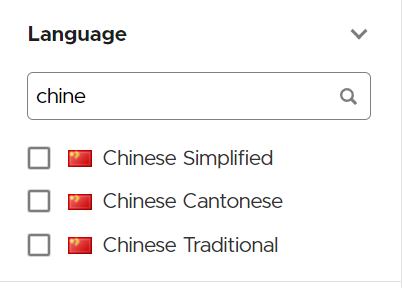
The language filter displays all templates available in the chosen languages. Initially, only a subset of 10 languages is shown by default.
To locate languages not listed, utilize the language search bar.
{% endtab %}
{% tab title="Type" %}
The type section classifies the format of the content within the awareness templates. This helps in selecting a delivery method that will most effectively engage the target audience and reinforce learning.
**Video**:
* Multimedia presentations often incorporating visual and auditory elements to illustrate security concepts.
**Quiz**:
* Interactive assessments designed to test the audience's understanding of the security material covered.
**Game**:
* Engaging, often interactive activities aimed at educating through play, enhancing retention of security principles.
**Static**:
* Traditional, non-interactive content such as PDFs, images, or text documents providing information without user engagement.
**Mixed**:
* A combination of various formats to cater to different learning styles and preferences within the audience.
**Test**:
* Structured evaluations used to measure the audience’s knowledge and awareness of specific security topics.
**Poster**:
* Visual content designed for print or electronic display, highlighting key security messages or practices.
**Implementation**
* When editing an awareness template, use the Type dropdown to define the template's type.
This allows administrators to filter templates based on the mode of information delivery that best suits their campaign's objectives.
{% endtab %}
{% tab title="Target Audience" %}
The target audience filter helps you find all awareness templates relevant to the specific group within your organization you are aiming to train or evaluate. Some awareness templates are tailor-made for technical staff like developers or system administrators, while others are suited for corporate users, including C-level executives.
**End-user**:
* Content is intended for the general workforce or individuals who use IT systems and services.
* Focuses on common security practices, phishing awareness, and safe internet habits.
**IT Expert**:
* Tailored for professionals with technical roles in information technology.
* Covers in-depth security protocols, advanced threat detection, and system-specific security measures.
**Management**:
* Designed for executives and department heads.
* Emphasizes strategic security planning, risk management, and policy enforcement.
**Implementation**
* Select the target audience that corresponds with the group for which the awareness template is being developed.
This targeting ensures that the material is relevant and the language used is appropriate for the audience's role and level of expertise.
{% endtab %}
{% tab title="Difficulty Level" %}
The Difficulty Level categorizes awareness templates based on the level of complexity and the knowledge required to understand the content. This classification aids in selecting the appropriate template that matches the intended audience's expertise.
**Low Level**:
* Suitable for a broad audience, including individuals with minimal to no prior knowledge of security awareness topics.
* The content is straightforward and uses basic language to ensure comprehension.
**Medium Level**:
* Targeted at users with a moderate understanding of security concepts.
* Templates include more detailed information and may introduce more complex terms, requiring a foundational level of security awareness.
**High Level**:
* Designed for an audience with advanced knowledge of security awareness.
* Complex concepts and industry-specific jargon are prevalent, necessitating a high degree of familiarity with the subject matter.
**Implementation**
* When creating or editing awareness templates, select the appropriate difficulty level that best matches the complexity of the material and the intended audience's expertise level.
This categorization helps administrators to filter and choose templates that align with their educational goals and the knowledge level of their audience.
{% endtab %}
{% tab title="Duration" %}
The duration section specifies the length of time required to complete an awareness activity or consume content. This information helps in planning and allocating appropriate time slots for security training sessions.
Specify the estimated time required to complete the template when editing a template.
{% endtab %}
{% endtabs %}
***
### **Search, Actions, and Sorting**
The upper bar in the template directory offers functionalities such as search, the ability to perform actions specific to templates, and options to sort the displayed results.
{% tabs %}
{% tab title="Search" %}
The Search bar functions as a global search tool, allowing you to retrieve all templates that match your specified keywords.
{% endtab %}
{% tab title="Actions" %}
* **Copy**: Duplicate the selected template within the directory.
* **Restore**: Import a previous Backup template.
* **Backup**: Create a save point for the selected template to preserve its current state as a downloadable backup.
* **Delete**: Permanently remove the selected template from the directory.
{% endtab %}
{% tab title="Sort" %}
By default, templates are sorted from newest to oldest. However, you can choose to sort them alphabetically, by the date they were added, or by the date they were last customized.
{% endtab %}
{% tab title="Tab / List View" %}
This display toggle allows you to switch between viewing the template results as tiles or in a list format.
Tiles:
List:
{% endtab %}
{% tab title="Favorites" %}
Starting in Lucy version 5.1 you may select your favorite templates and use the "Starred" filter option to view them:
{% hint style="info" %}
Click the :star: icon on any template to favorite or unfavorite it.
{% endhint %}
{% endtab %}
{% endtabs %}
***
### Dynamically preview an Awareness template
Lucy enables administrators to dynamically preview any template, allowing them to understand the construction, flow, and logic of both the email and landing pages.
***
{% hint style="success" %}
Ready to edit a template? See our guide to[ customize an awareness template](/guides/awareness-training/awareness-template-customization.md).
{% endhint %}
***
---
# Agent Instructions
This documentation is published with GitBook. GitBook is the documentation platform designed so that both humans and AI agents can read, navigate, and reason over technical content effectively. Learn more at gitbook.com.
## Querying This Documentation
If you need additional information that is not directly available in this page, you can query the documentation by asking a question.
Perform an HTTP GET request on the following URL with the `ask` and `goal` query parameters:
```
GET https://wiki.lucysecurity.com/application-reference/templates/awareness-templates.md?ask=&goal=
```
`ask` is the immediate question: it should be specific, self-contained, and written in natural language.
`goal` is what the user is ultimately trying to achieve, the reason they need the answer. Sharing it helps GitBook give you a better, more relevant answer. A goal is most helpful when it describes the outcome the user wants rather than restating the question. For example, with `ask=how do I create an API token`, a goal like `automate deployments from our CI pipeline` lets GitBook tailor the answer to that use case.
The response will contain a direct answer to the question and relevant excerpts and sources from the documentation.
Use this mechanism when the answer is not explicitly present in the current page, you need clarification or additional context, or you want to retrieve related documentation sections.