> For the complete documentation index, see [llms.txt](https://wiki.lucysecurity.com/llms.txt). Markdown versions of documentation pages are available by appending `.md` to page URLs; this page is available as [Markdown](https://wiki.lucysecurity.com/application-reference/users/end-users.md).
# End Users
## Introduction
Users may not always have time to complete an awareness course immediately. While they can reschedule their training, you can also provide a login page that allows them to access their custom training links at any time without needing a new awareness email.
Through this login page, users can also view their lifetime statistics, [risk level](/application-reference/users/risk-score.md), and [training diplomas](/application-reference/templates/awareness-training-diploma.md) from completed courses.
{% hint style="info" %}
An **end user** is a recipient who has an End User Portal account.
All end users are recipients, but not all recipients are end users.
{% endhint %}
***
## Enabling End Users
The end user portal is enabled per-campaign in the Awareness Settings.
Go to **Awareness Education > End Users** and enable the checkbox:
{% hint style="info" %}
#### End User Portal URL
The End User Portal is located in the `/user` directory of your server.
For example, if your server address is `https://my.lucyserver.com`, the portal login page will be available at `https://my.lucyserver.com/user/.`
{% endhint %}
***
## Creating End Users
Lucy automatically creates end-user profiles for recipients who receive awareness training within a campaign, as long as **End User Profiles** is enabled.
End users can also be created via import through [**Active Directory**](/application-reference/settings/common-system-settings/azure-ad-settings.md) or [**LDAP**](/application-reference/settings/common-system-settings/ldap-settings.md).
***
## Portal Settings
#### User Profile Page Link
You can configure the portal URL on a per-campaign basis. However, it is recommended to use **System Defaults** and configure the URL in the [**End User Portal Settings**](/application-reference/users/end-user-portal-settings.md) instead.
* **Lucy Support UI Domain** – Uses the same domain as your admin portal.
* **IP Address** – Uses a raw IP address. Recommended for testing only.
* **System Defaults** – Uses the URL configured in [**End User Portal Settings**](/application-reference/users/end-user-portal-settings.md).
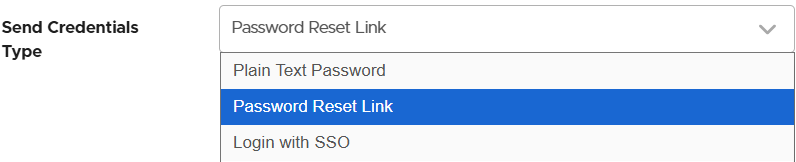
#### Send Credentials Type
Choose how passwords are delivered to end users.
* **Plain Text Password** – Sends the password as a **.txt attachment** with the campaign email. Recommended for testing only.
* **Password Reset Link** – Includes a password reset link in the campaign email. If selected, the email must contain the variable **%user-password-reset%**.
* **Login with SSO** – Uses your **SSO workflow** to authenticate end users. If selected, the email must contain the variable **%user-login-url%**.
#### End User Direct Login
Enable this option to allow end users to log in directly by navigating to the **End User Portal URL**.
If you plan to disable campaign emails, this setting **must** be enabled first.
***
## Managing End Users
Existing end users can be managed from the **End Users** page.
Navigate to: **Users → End Users**
Administrators can open an end user’s portal page by selecting the user’s name. From the portal view, administrators can also update the user’s information and reset their password through the **User Settings** page.
---
# Agent Instructions
This documentation is published with GitBook. GitBook is the documentation platform designed so that both humans and AI agents can read, navigate, and reason over technical content effectively. Learn more at gitbook.com.
## Querying This Documentation
If you need additional information that is not directly available in this page, you can query the documentation by asking a question.
Perform an HTTP GET request on the following URL with the `ask` and `goal` query parameters:
```
GET https://wiki.lucysecurity.com/application-reference/users/end-users.md?ask=&goal=
```
`ask` is the immediate question: it should be specific, self-contained, and written in natural language.
`goal` is what the user is ultimately trying to achieve, the reason they need the answer. Sharing it helps GitBook give you a better, more relevant answer. A goal is most helpful when it describes the outcome the user wants rather than restating the question. For example, with `ask=how do I create an API token`, a goal like `automate deployments from our CI pipeline` lets GitBook tailor the answer to that use case.
The response will contain a direct answer to the question and relevant excerpts and sources from the documentation.
Use this mechanism when the answer is not explicitly present in the current page, you need clarification or additional context, or you want to retrieve related documentation sections.